System in Motion
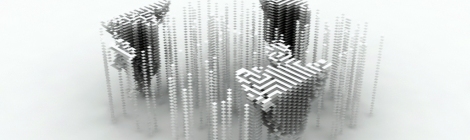
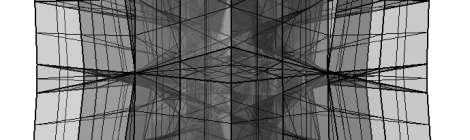
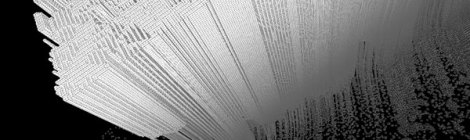
Growing vs Building. The idea of growing inhabitats instead of building them still belongs to sorcerer’s apprentices but computing can give us glimpses. This is a visualization of previous cell[f] assembly code (based on Conway’s Game of Life).
The animation is coded in processing with bespoke camera angles.
Processing source code below:
import processing.opengl.*;
import toxi.geom.*;
int cols = 400;
int rows = 70;
float density = 0.97;
int MaxGeneration = 300;
int Generation =0;
int z = 0;
int[][] arrPt;
void setup() {
smooth();
size(1200, 800, OPENGL);
camera (50, 150, 300, 70, 30, 100, -1, 1, -1);
background(0);
randomGenesis(cols, rows);
}
void draw() {
Generation = Generation+1;
if ((Generation<MaxGeneration)&&(Generation>=0)) {
arrayCellTwister(arrPt, Generation);
arrPt=mutateArray(arrPt);
}
if (Generation==MaxGeneration) {
delay(500);
Generation = 0;
background(0);
randomGenesis(cols, rows);
}
}
Cell-f assembly
Inspired by the reading of AN EVOLUTIONARY ARCHITECTURE by John Frazer and the generative toolbox.
Structure generations based on John Orton Conway’s Game of Life. The goal is to explore the emerging resulting patterns of the genetic algorithm whilst stacking all generations. The automation requires an initial finite array of cells and a maximum number of generations. Their initial state (life or death) is randomly assigned based on an arbitrary threshold. The script calls a recursive routine that decides the state of each cell (life or death) depending on the state of their neighbours (8 in total) at the end of each iteration. In order to best approximate an infinite game board, the automation wraps at the edges.
The stacking generates unexpected & elaborate patterns in xyz directions. The search for emergent behaviours is on.
The initial script has been developed in Python for Rhino5. This version is not optimized but presents a clear function split. The sumNeighbours function is inspired from an elegant solution by algorithmicdesign.net
Code:
import rhinoscriptsyntax as rs
import math
import random
def RandomGenesis(intGridi,intGridj):
arrPt=[]
for i in range(intGridi):
arrj=[]
for j in range(intGridj):
rnd = random.random()
if rnd>0.97:# density threshold for initial cells
arrj.append(1)
else:
arrj.append(0)
arrPt.append(arrj)
return arrPt # arrPt is a list of i no. lists _ each list contains j no. elements (1s or 0s)
Cell[f] Automaton Habitat
A [near] perfect mathematic structure affected by a chaotic process
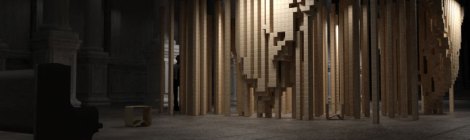
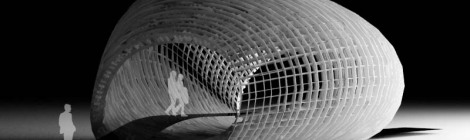
The variety of forms in nature seems endless. Patterns can derive from mathematical rules. Habitats can derive from patterns. The pavilion is a temporary proposal for a historic hall. It reflects new built orders and hidden rules in contrast with those of its classical backdrop. Of course, a genetic algorithm is no guarantee of beauty but the outcomes can be striking. The matrix of self assembling timber cubes expresses the invisible forces of life and death that affect each brick… each of us.
Free-form & flat quads with Rhino.Python
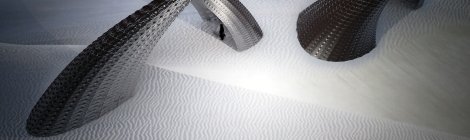
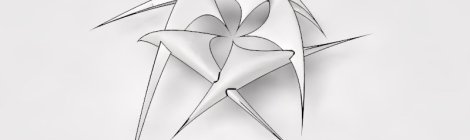
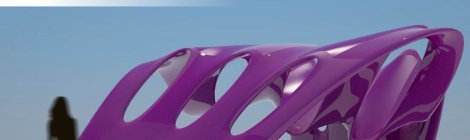
Fossile-like structures made of flat quad panels. Panels can be assembled along their folded sides. The script works with free from surfaces (trimmed or not_see conditional minimum distance between any point evaluated within surface domain and the base surface_as per Python Primer example)
CODE:
import rhinoscriptsyntax as rs
import random #import random module
def SurfaceQuad():
idSurface=rs.GetObject("Select Surface",8,True,False)
if not idSurface:return
intCountU = rs.GetInteger("Number of panels in U direction",20,10)
if not intCountU:return
intCountV = rs.GetInteger("Number of panels in V direction",7,5)
if not intCountV:return
uDomain=rs.SurfaceDomain(idSurface,0)
vDomain=rs.SurfaceDomain(idSurface,1)
uStep=uDomain[1] - uDomain[0]
uStep=uStep / intCountU
vStep=vDomain[1] - vDomain[0]
vStep=vStep / intCountV
#Tolerance in between panels
dblTolU = uStep/100
dblTolV = dblTolU*intCountU/intCountV
rs.EnableRedraw(False)
for v in rs.frange(vDomain[0],vDomain[1]-vStep-vDomain[0],vStep):
for u in rs.frange (uDomain[0],uDomain[1]-uStep-uDomain[0],uStep):
#Evaluate panel coordinates on idSurface
PROTO/E/CO/LOGICS//
SPECULATIVE MATERIALISM IN ARCHITECTURE
SYMPOSIUM / ROVINJ / CROATIA / 6-7 AUGUST// curated by Alisa Andrasek and Bruno Juricic
links:
http://proto-e-co-logics.com
and
http://www.aaschool.ac.uk/STUDY/VISITING/rovinj.php
The symposium will tease out speculative directions for architecture that move beyond innocent and reductive approaches to ecology as in notions of “sustainability” and “green”. As Slavoj Zizek reminds us, the so called “balance of nature” is in itself a myth since catastrophes have always been an integral part of natural history. Rather than acting from a position of idealization with regards to nature, can we conceive of agency within a condition that isalready artificial, accepting noise and errors, embracing true face of complexity?
Recent tendencies in architecture take a unique point of view, with aesthetically novel and unnatural sensibilities emerging from a close scrutiny and study of apparently natural systems. These speculative tendencies are being driven by mathematical and computational abstractions that transform the way we understand the matter-information relationship. Instead of form being imprinted upon matter, matter is understood as an active agent in its own formation. It promotes dissolution of linear hierarchies, enabling heterogeneous and non-linear nature of complex agencies to hybridize and be incorporated into increasingly complex fabric of architecture. Under this accelerated convergence of matter-information, architecture can begin to speculate its own possible futures within denaturalized material ecology and conditions far from equilibrium.
Shingles flow
Script developed to populate free-form surfaces with overlapping irregular panels otherwise known as ‘shingles’. Sculpture project for North Scotland by biomorphis.
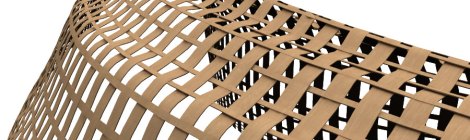
Weaving frame – Boreal House
Weaving Rhinoscript sample:
‘———-knitting V TWIN curves 1ST series—————————————————————–
For q=0 To strDivU Step 2
dblParameterU=arrDomU(0) +((arrDomU(1)-arrDomU(0))/strDivU)*q
For p=0 To strDivV Step 4
dblParameterV=arrDomV(0)+((arrDomV(1)-arrDomV(0))/strDivV)*p
vecNormal=rhino.SurfaceNormal(strSurface,Array(dblParameterU,dblParameterV))
newVecNormal = vecnormal
newVecNormal(2)= dblIntense
arrCtrPt1(q)(p)= Rhino.PointSubtract(arrCtrPt1(q)(p),newVecNormal)
arrCtrPt2(q)(p)= Rhino.PointSubtract(arrCtrPt2(q)(p),newVecNormal)
Next
For p=1 To strDivV Step 4
arrCtrPt1(q)(p)(2)= (arrCtrPt1(q)(p)(2))
arrCtrPt2(q)(p)(2)= (arrCtrPt2(q)(p)(2))
Next
For p=2 To strDivV Step 4
dblParameterV=arrDomV(0)+((arrDomV(1)-arrDomV(0))/strDivV)*p
vecNormal=rhino.SurfaceNormal(strSurface,Array(dblParameterU,dblParameterV))
arrCtrPt1(q)(p)= Rhino.PointAdd(arrCtrPt1(q)(p),newVecNormal)
arrCtrPt2(q)(p)= Rhino.PointAdd(arrCtrPt2(q)(p),newVecNormal)
Next
For p=3 To strDivV Step 4
arrCtrPt1(q)(p)(2)= (arrCtrPt1(q)(p)(2))
arrCtrPt2(q)(p)(2)= (arrCtrPt2(q)(p)(2))
Next
For p=4 To strDivV Step 4
dblParameterV=arrDomV(0)+((arrDomV(1)-arrDomV(0))/strDivV)*p
vecNormal=rhino.SurfaceNormal(strSurface,Array(dblParameterU,dblParameterV))
arrCtrPt1(q)(p)= Rhino.PointSubtract(arrCtrPt1(q)(p),newVecNormal)
arrCtrPt2(q)(p)= Rhino.PointSubtract(arrCtrPt2(q)(p),newVecNormal)
Next
ReDim Preserve arrVCurves1(q)
arrVCurves1(q)= Rhino.AddCurve(arrCtrPt1(q),2)
ReDim Preserve arrVCurves2(q)
arrVCurves2(q)= Rhino.AddCurve(arrCtrPt2(q),2)
Call rhino.AddLoftSrf(array(arrVCurves1(q),arrVCurves2(q)))
Next
spider evolution
during the course of my investigation of simplistic model ideas with large number of different outcomes, I found myself working on a circular stack of triangles which are defined by few simple parameters. each parameter was originally defined by the user (the coding was left within the script but deactivated), however, as I was going through different settings to get shapes which are very different from each other for testing purposes, I decided to fully randomise the script. I have settled for the boundary condition of 20 units randomly picked to speed up the process of the shape search. within a matter of several minutes I have generated some 30 random shapes which were eventually dubbed ‘spider evolution’. I’m now planning to expand the script or modify it for other purposes. the script is available for download.
.:script example:.
Option Explicit
‘Script written by shane gregoran
‘Script version 30 August 2010 00:20:56 updated 28 October 2010
Call p04TriangularSomethings()
Sub p04TriangularSomethings()
‘for this purpose all random numbers have been set to max of 20
‘Dim nPts : nPts = Rhino.GetReal(“how many segments”, 12)
Dim nPts : nPts = Floor(rnd*20)
If nPts < 3 Then
nPts = 3
End If
Dim cp : cp = Rhino.WorldXYPlane
cp(0)(2) = Floor(rnd*10)
‘Dim iR : iR = Rhino.GetReal(“length of short triangulation”,10)
Dim iR : iR = Floor(rnd*20)
If iR < 1 Then
iR = 1
End If
‘Dim R : R = Rhino.GetReal(“length of segments”,15)
Dim R : R = Floor(rnd*20)
If R < 1 Then
R = 1
End If
TAC – Technically Advanced Construction – Lectures Live
TAC – Technically Advanced Construction 2011 Milano 
Organized by Politecnico di Milano and friends from Co-de-iT . One of the most interesting events for 2011 in Italy on advanced construction, with some great people lecturing.
gravity field visualization experiment
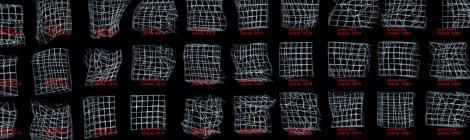
Gfield script is an attempt to visualize the units of space-time as they are distorted by a gravity type field. given that each ‘cube’ represents a unit of space-time, greatly enlarged for this purpose, the distortions of each said unit will continue until the geometry can no longer represent a ‘cube’ type space, at which point the ‘cube’ will vanish. at a later time I plan to add additions to the script to uphold a change in geometry from a standard eight point geometric shape to one that can support seven or less points as well as adding mass value which will increase the strength of field generated by the attractor point for each unit of space-time that has collapsed onto the attractor point. the following video is a top view of the change in the quantity of space-time units and how they are distorted over time.
I will, given time, make another ‘perspective view’ video to further represent the three dimensionality of the changes taking place. script is available for download.
.: script example:.
Option Explicit
‘Script written by shane gregoran
‘Script version 06 May 2010 18:31:30 updated 21 October 2010
Call SpaceDistortionAttractor()
Sub SpaceDistortionAttractor()
‘first we create our playground
Dim Area : Area = Rhino.GetInteger(“Area covered”,10)
If IsNull(Area) Then Exit Sub
Dim side : side = Rhino.GetReal(“Distance between points”,0.5)
If IsNull(side) Then Exit Sub
Dim Gforce1 : Gforce1 = Rhino.GetReal(“Strength of the field (higher number yields bigger projection)”, 0.1)
If IsNull(Gforce1) Then Exit Sub
Dim PtNumber : PtNumber = Area^3 – 1
Dim x : x = 0
Dim y : y = 0
Dim z : z = 0
Dim m1 : m1 = 1
Dim m2 : m2 = 1
Dim Sphere, boxID
Dim AttPt, AttPx, AttPy, AttPz
AttPx = (Area*side)/2
AttPy = (Area*side)/2
AttPz = (Area*side)/2
AttPt = Array(AttPx,AttPy,AttPz)
‘Sphere = Rhino.AddSphere (AttPt,2)
‘Rhino.ObjectColor Sphere,RGB(255,0,0)
Dim Box, i, j, k
Dim T : T = -1
Dim A, B, C, D, E, F, G, H
ReDim Box(PtNumber), A(PtNumber), B(PtNumber), C(PtNumber), D(PtNumber), E(PtNumber), F(PtNumber), G(PtNumber), H(PtNumber)
Call Rhino.EnableRedraw(False)
Rhino.Print “please wait… universe is being sucked into a hole”
Twirl_RhinoScript
Option Explicit
‘Script written by <pierre forissier> for nCodon
Call Main()
Sub Main()
‘>>>>>>>>>>>>>>>>>>>>>>>>>>>>>>>>>
‘Points cloud for twirl base curve
Dim arrPoint0, arrPoint1, arrPoint2, arrPoint3
Dim arrCtlPts()
Dim i
Dim N
Dim crvBase
N=0
For i = 0 To 500 Step 5
arrPoint0 = array(rnd*10,(rnd*10),i)
arrPoint1 = array(90+rnd*10,(10*rnd),i)
arrPoint2 = array(90+10*rnd,(90+rnd*10),i)
arrPoint3 = array(rnd*10,(90+10*rnd),i)
ReDim Preserve arrCtlPts(N)
arrCtlPts(N) = arrPoint0
ReDim Preserve arrCtlPts(N+1)
arrCtlPts(N+1) = arrPoint1
ReDim Preserve arrCtlPts(N+2)
arrCtlPts(N+2) = arrPoint2
ReDim Preserve arrCtlPts(N+3)
arrCtlPts(N+3) = arrPoint3
N=N+4
Next
crvBase = Rhino.AddCurve(arrCtlPts,2)
‘>>>>>>>>>>>>>>>>>>>>>>>>>>>>>>>>>
‘Twirl
Call Rhino.EnableRedraw(False)
Dim intSamples : intSamples = 1000
Dim crvDomain : crvDomain = Rhino.CurveDomain(crvBase)
Dim t, M
Dim arrCrossSections(), CrossSectionPLane
Dim crvPoint, crvTangent, crvPerp, crvNormal
M=0
For t = crvDomain(0) To crvDomain(1) + 1e-9 Step (crvDomain(1)-crvDomain(0))/2000
crvPoint = Rhino.EvaluateCurve(crvBase,t)
crvTangent = Rhino.CurveTangent(crvBase,t)
crvPerp = Array(0,0,1)
crvNormal = Rhino.VectorCrossProduct(crvTangent, crvPerp)
CrossSectionPlane = Rhino.PlaneFromFrame(crvPoint,crvPerp,crvNormal)
ReDim Preserve arrCrossSections(M)
arrCrossSections(M) = Rhino.AddCircle(CrossSectionPlane,1)
M = M+1
Next
Call Rhino.AddLoftSrf(arrCrossSections)
‘>>>>>>>>>>>>>>>>>>>>>>>>>>>>>>>>>
‘Twirl connectors
Dim arrPtBaseConnect1, arrPtBaseConnect2
Dim arrPtTopConnect1
Dim j
For j = crvDomain(0) To crvDomain(.7) Step ((crvDomain(1)-crvDomain(0))/intSamples)*20.1
Dim dblRandom1 : dblRandom1 = rnd*.3
arrPtBaseConnect1 = Rhino.EvaluateCurve(crvBase, j+dblRandom1)
arrPtBaseConnect2 = Rhino.EvaluateCurve(crvBase, j+dblRandom1+.1)
arrPtTopConnect1 = Rhino.EvaluateCurve(crvBase, j+4.3)
Dim crvConnector1 : crvConnector1 = Rhino.Addline(arrPtBaseConnect1, arrPtTopConnect1)
Dim objBaseSphere1 : objBaseSphere1 = Rhino.AddSphere(arrPtBaseConnect1, 2)
Dim objBaseSphere2 : objBaseSphere2 = Rhino.AddSphere(arrPtBaseConnect2, 2)
Dim objTopSphere1 : objTopSphere1 = Rhino.AddSphere(arrPtTopConnect1, 2)
Dim objCylindLink1 : objCylindLink1 = Rhino.AddCylinder (arrPtBaseConnect1, arrPtTopConnect1, 0.3)
Dim objCylindLink2 : objCylindLink2 = Rhino.AddCylinder (arrPtBaseConnect2, arrPtTopConnect1, 0.3)
Next
Call Rhino.EnableRedraw(True)
End Sub
‘Script written by <pierre forissier>
Call Main()
Sub Main()
‘>>>>>>>>>>>>>>>>>>>>>>>>>>>>>>>>>
‘Points cloud for twirl base curve
Dim arrPoint0, arrPoint1, arrPoint2, arrPoint3
Dim arrCtlPts()
Dim i
Dim N
Dim crvBase
N=0
For i = 0 To 500 Step 5
arrPoint0 = array(rnd*10,(rnd*10),i)
arrPoint1 = array(90+rnd*10,(10*rnd),i)
arrPoint2 = array(90+10*rnd,(90+rnd*10),i)
arrPoint3 = array(rnd*10,(90+10*rnd),i)
ReDim Preserve arrCtlPts(N)
arrCtlPts(N) = arrPoint0
ReDim Preserve arrCtlPts(N+1)
arrCtlPts(N+1) = arrPoint1
ReDim Preserve arrCtlPts(N+2)
arrCtlPts(N+2) = arrPoint2
ReDim Preserve arrCtlPts(N+3)
arrCtlPts(N+3) = arrPoint3
N=N+4
Next
crvBase = Rhino.AddCurve(arrCtlPts,2)
‘>>>>>>>>>>>>>>>>>>>>>>>>>>>>>>>>>
‘Twirl
Call Rhino.EnableRedraw(False)
Dim intSamples : intSamples = 1000
Dim crvDomain : crvDomain = Rhino.CurveDomain(crvBase)
Dim t, M
Dim arrCrossSections(), CrossSectionPLane
Dim crvPoint, crvTangent, crvPerp, crvNormal
M=0
For t = crvDomain(0) To crvDomain(1) + 1e-9 Step (crvDomain(1)-crvDomain(0))/2000
crvPoint = Rhino.EvaluateCurve(crvBase,t)
crvTangent = Rhino.CurveTangent(crvBase,t)
crvPerp = Array(0,0,1)
crvNormal = Rhino.VectorCrossProduct(crvTangent, crvPerp)
CrossSectionPlane = Rhino.PlaneFromFrame(crvPoint,crvPerp,crvNormal)
ReDim Preserve arrCrossSections(M)
arrCrossSections(M) = Rhino.AddCircle(CrossSectionPlane,1)
M = M+1
Next
Call Rhino.AddLoftSrf(arrCrossSections)
‘>>>>>>>>>>>>>>>>>>>>>>>>>>>>>>>>>
‘Twirl connectors
Dim arrPtBaseConnect1, arrPtBaseConnect2
Dim arrPtTopConnect1
Dim j
For j = crvDomain(0) To crvDomain(.7) Step ((crvDomain(1)-crvDomain(0))/intSamples)*20.1
Dim dblRandom1 : dblRandom1 = rnd*.3
arrPtBaseConnect1 = Rhino.EvaluateCurve(crvBase, j+dblRandom1)
arrPtBaseConnect2 = Rhino.EvaluateCurve(crvBase, j+dblRandom1+.1)
arrPtTopConnect1 = Rhino.EvaluateCurve(crvBase, j+4.3)
Dim crvConnector1 : crvConnector1 = Rhino.Addline(arrPtBaseConnect1, arrPtTopConnect1)
Dim objBaseSphere1 : objBaseSphere1 = Rhino.AddSphere(arrPtBaseConnect1, 2)
Dim objBaseSphere2 : objBaseSphere2 = Rhino.AddSphere(arrPtBaseConnect2, 2)
Dim objTopSphere1 : objTopSphere1 = Rhino.AddSphere(arrPtTopConnect1, 2)
Dim objCylindLink1 : objCylindLink1 = Rhino.AddCylinder (arrPtBaseConnect1, arrPtTopConnect1, 0.3)
Dim objCylindLink2 : objCylindLink2 = Rhino.AddCylinder (arrPtBaseConnect2, arrPtTopConnect1, 0.3)
Next
Call Rhino.EnableRedraw(True)
End Sub
Change/Time Component of a Form
/‘concrete geometries’ – a resultants of a continual actualization of the moment now/
It is suggested that a change/time is a fundamental element of a form and that it is necessary to view the change sequence as an intrinsic component of it. Perceiving change/time as inseparable quality implies that all of the parameters that are impacting a particular formation are directly linked to its basic structure and acting together.
As the change is perceived as a fundamental element of a form, than all of the factors and conditions that are impacting it, become essential to the form itself – it can not be viewed as a separate entity any longer – it becomes evident that its actual structure and the conditions shaping it along the streamlines of change/time are fused and working in essentially interconnected way.
It is suggested that changing the way in which we think about the forms to view them as inseparable of the flux of change, can give birth to a ‘higher’ level method planning, where parameters of change/time are included in the initial description and the basic structure of the form, giving it an integrated response mechanisms and a living entity qualities.
Most importantly, the spontaneous processes of change present a very powerful source of energy. The knowledge that would enable ‘connecting’ the forms with the processes and fluxes that are already in place, would empower in a sense that instead of giving a solutions that are made to withstand the change and in principle work against it, it would present a mean of ‘tapping’ into these resources.
Realizing and implementing this force of change, ie. the flow of matter, will potentially present a very powerful resource, whose occurrence in the architectural practice so far has been seen more along the lines of the external conditions, a sort of a consequence, rather than seeing it as a very potent source.
Unspecified Form
Unspecified Form
by Bojana Vuksanović
an infinite number of possible forms
Overview
1. Introduction
2. The cultural background
3. The perfect form
4. Mathematics of space, objects and relationships
5. “Unspecified form” – the ‘cubes’ project
6. Design given as a function
7. Neutral configuration – dealing with the complexity
8. Designing the ‘essence’
definition surface population/test
00014
![]()
00014 test rhino/v-ray rendering engine
based on ‘Bounding box, divide interval and box component’ definition found at ARTC MIAMI / ARTC Miami / (requires registration/otherwise free)
gh definition / download /
PLANNED Spontaneity
Planned Spontaneity
by Bojana Vuksanović
Overview
1. Introduction
2. Planning
3. Spontaneity
4. The Issue of Complexity
5. Planned versus Spontaneous
6. Planned Spontaneity
7. Conclusion
Art Fund Pavilion Exhibited at the Lightbox
We have just received the news that Pierre Forissier’s Art Fund Pavilion, entered for Cre8Architecture Office is one of the 19 entries chosen to be exhibited at the Lightbox, together with:
- THEVERYMANY, USA, www.theverymany.net
- Tina Manis Associates, USA, www.tinamanis.com
- 3SIX0 Architecture & Design, USA, www.3six0.com
- AREA [Architecture Research Athens], Greece, www.areaoffice.gr
- Alexander Malm, Anna H. Denis & Henrik Börjesson, Sweden
- BCK Design, Canada, www.bckdesign.ca
- Cesare Grifffa, Mauro Fassino, Federico Rizzo, Italy, www.studiogriffa.net
- Diana Dina & Magdalena Vieriu , Romania, www.diana-dina.com
- Feix&Merlin Architects with Martin Stockley Associates, UK, www.feixandmerlin.com
- GABPA architects, USA, www.gabpa.com
- Interlaced (Britta Knobel, Carine Cohen & Florien Dubiel), UK, www.floriandubiel.net
- IN & EDIT Architecture, France
- Karim Muallem, UK
- LINKsignatur, Denmark, www.link-signatur.dk
- Maciej Walczuk, UK
- M. Olejniczak, A. Strzelecki, D. Kabza, M. Janiec, Poland
- Pracownia Projektowa Wloskowicz, Poland, www.wloskowicz.pl
- Swona (Andre Guimond & Evan Erlebacher), UK
More information at the art fund pavilion news website
Congratulations!!
aast///advanced architecture settimo tokyo
Generative Architecture events in Settimo Tokyo, promoter CASARTARC Settimo Torinese Association. aast is a group of events intended to spread Generative Computational Design, becoming an Advanced Architectural Research International Exhibition. aast gives the opportunity to professionals and students to test a new approach to design, using innovatory tools. aast is a survey of researches on new generations of architects oriented to understand the huge transformation of contemporary architecture perspectives. aast’s aim is the promotion of 3D parametric software, which is able to integrate all the building components and data into one parametric model. All the building information becomes highly manageable throughout all the design and construction phases. aast deals with the parametric software brand-new trend as generating design and extending design creativity. The convention will involve the discussion about complex forms impossible to be generated before and also raise a series of new design theories, methods and tools.
Congratulations to everyone involved, especially to curators Andrea Graziano, Lorena Alessio and Davide Del Giudice for making this event possible.
Art Fund Pavilion competition submission


Parametric pavilion modelled in rhino + grasshopper.
I started the whole pavilion with 5 curbs (that will be lofted) and a grid of perpendicular lines (that will make the ribs of the pavilion).

The build-up (essentialy creating the ribs with adjustable parameters) was made with grasshopper.

And the final frame looks as below

The whole thing was eventually exported to 3d Studio and rendered with vray as this is my favorit combination to render.
You will see that the grasshopper definition is far from short as I did not manage to get the result in any other way.
Here is at last a link to the GH file
http://dl.dropbox.com/u/20191438/ncodon/Panelion%20GHX/panelion.ghx
As I commented below, this is far from pretty as I ran short of time for the competition and had to get a result.. So any suggestion to make this smarter is welcome!
Once modelled with Rhino, I exported the model to 3d Studio and rendered all with vray. You can download the scene here http://drop.io/panelscene3ds


leave a comment